 Bojan
BojanI Built a Self-Improving Workflow for Claude Code
I built a Claude Code template with session memory, hook enforcement, and a self-improving feedback loop. It captures mistakes automatically and generates rules to prevent them. Install in any project with one command.
# I Built a Self-Improving Workflow for Claude Code
A few weeks ago I noticed I was reminding Claude Code of the same things over and over. Run the tests. Re-read the file before editing. Use sub-agents for big tasks. Don’t claim “Done” without showing the output. The rules were in CLAUDE.md, but Claude drifted as the session got longer. Every fresh session I had to reload context manually. Every mistake had to be corrected manually. Every gotcha was logged manually.
I wanted a system that would do all of that on its own. So I built one.
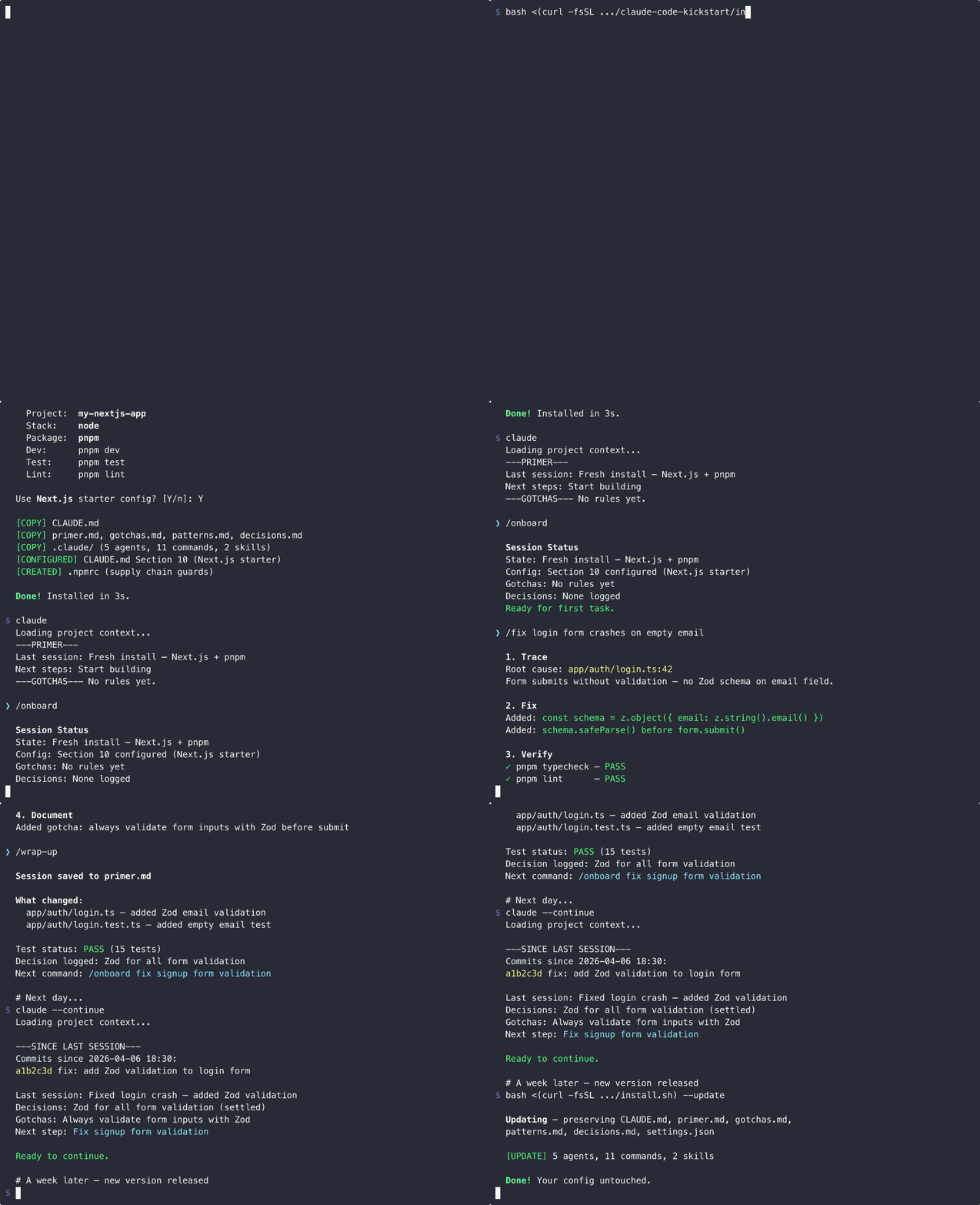
It is called Claude Code Kickstart, and it lives at github.com/codeverbojan/claude-code-kickstart. Install it in any project with one command:
bash <(curl -fsSL https://raw.githubusercontent.com/codeverbojan/claude-code-kickstart/main/install.sh)The wizard auto-detects your stack from package.json, go.mod, Cargo.toml, or pyproject.toml. It reads your actual commands from package.json scripts or your Makefile. It offers framework-specific starter configs for Next.js, FastAPI, Go API, and Rust CLI projects. You confirm the detection, optionally add conventions, and the template installs in about three seconds.
That part is convenience. The interesting part is what happens after.
The Four Layers
Most CLAUDE.md setups dump everything into one giant file and hope Claude reads it. The problem is that long context decays. Rules at the top get summarized when auto-compaction fires. Rules at the bottom get ignored after a few turns. The whole thing is loaded on every request even when you are doing a one-line fix.
Kickstart splits the system into four layers with different costs:
- CLAUDE.md – strict operating rules, always loaded, kept under 170 lines
- Commands and agents – task playbooks loaded only when invoked
- Skills and cheatsheet – reference material loaded on demand
- Memory files – session state auto-loaded via a hook
A small fix loads four small files. A big feature loads the full context with sub-agents. The cost is proportional to the work.
Session Memory That Survives
The memory layer is where it stops being just another template. Four files get auto-loaded at session start by a hook in settings.json:
primer.mdis the structured handoff from your last session: what changed, test status, decisions, risks, next stepsgotchas.mdis the mistake log that grows over timepatterns.mdis the actual code patterns extracted from your codebase by the/learncommanddecisions.mdis the why behind technical choices, so Claude does not re-litigate settled decisions
The hook also runs git log --since against the modification time of primer.md to show you what changed between sessions. If three teammates pushed twelve commits while you were asleep, Claude knows about them before you say anything.
Task Playbooks
Instead of one giant ruleset, Kickstart provides focused playbooks as slash commands:
/fixfor bug fixes (trace root cause, scope, fix, verify, document)/featurefor new features (plan, build in phases, verify each phase)/refactorfor cleanups (delete dead code first, restructure, verify)/api-routefor endpoints (auth, validate, query, respond, security check)/researchfor investigation (no code, just synthesis)
Each playbook tells Claude exactly what behavior to use for that task type. No more “is this a feature or a refactor” guessing. The user picks the playbook, Claude follows it.
There are also lifecycle commands:
/onboardfor status,/onboard deepfor full project exploration/wrap-upfor structured session handoffs/resetfor wrap-up plus clear plus deep onboard in one step/initto auto-generate Section 10 by reading your codebase/learnto extract real code patterns into patterns.md
Hook Enforcement
Rules in markdown are advisory. Hooks are deterministic. Kickstart uses five of them:
- SessionStart loads all four memory files plus git history into context
- UserPromptSubmit runs a habits coach that nudges you toward good practices when it detects bad ones
- Stop is a verification gate. When Claude tries to claim “Done” without showing test output, a Haiku call evaluates the response and blocks it if verification was skipped
- PreToolUse on Edit and Write injects a re-read reminder before file modifications
- PostToolUse on Bash captures mistake signals (git reverts, test failures, lint failures) to a JSONL file, asynchronously, with no latency
The habits coach is the one that surprised me most. It uses systemMessage in the hook output, which is shown to the user (not Claude) as a yellow tip. If you say “hey” to a fresh session, you get a quiet nudge: “Try /onboard to load project context.” If you say “fix the login bug” without using /fix, you get a different nudge. If you say “thanks im done” without running /wrap-up, you get reminded. It catches the lazy moments without blocking anything.
The Self-Improving Part
This is the part nobody else has built.
The PostToolUse hook captures signals automatically. When you run git restore on a file Claude edited, it logs a revert signal. When pnpm test exits non-zero after Claude said “Done”, it logs a test failure with the first 500 characters of the failure output. Secrets like Bearer tokens and API keys are scrubbed before logging.
Then there is /retrospective. It reads .claude/signals.jsonl, groups signals by type, uses the failure snippets to identify root cause patterns, deduplicates against existing gotchas, and appends new numbered rules to gotchas.md under an ## Auto-generated section. After running it, Claude has new rules it learned from its own mistakes.
There is also /metrics which reads .claude/metrics.jsonl (appended each /wrap-up) and shows trends: signal rate over time, verification ratio, gotcha growth. With at least five sessions of data, it gives you actionable insights like “Mistake rate is rising, consider running /retrospective” or “Fewer mistakes over time, the gotchas are working.”
The whole loop is:
Mistake happens-> PostToolUse hook captures it -> /retrospective generates a gotcha rule -> gotchas.md grows -> Auto-loaded next session -> Claude avoids the same category -> Metrics show improvement over time
You do nothing. The system writes its own rules from experience.
Supply Chain Guards
Because Node.js dependency attacks are getting worse, the wizard generates an .npmrc for Node projects with these settings:
ignore-scripts=trueminimum-release-age=10080 save-exact=true strict-peer-dependencies=true audit=true
The ignore-scripts=true would have blocked the April 2026 Axios attack entirely, since that exploit used a malicious postinstall hook. The minimum-release-age=10080 adds a 7-day soak period so freshly published packages cannot be installed immediately. The save-exact=true pins versions so a dependency cannot silently upgrade.
This is the difference between “be careful” advice and enforcement. The guards are configured at the package manager level. Even if you forget, the system protects you.
What Makes It Different
I researched the space pretty thoroughly while building this. There are good projects out there. Superpowers from Jesse Vincent has the strongest skill enforcement patterns. GSD has a massive command set. Most teams have their own CLAUDE.md they copied from a blog post.
None of them have all of these together:
- Auto-detection from project files (not just questions)
- Session memory that persists across sessions
- Project intelligence via
/learnanddecisions.md - Git-aware session start
- Tiered onboarding (status, light, deep)
- Hook-based enforcement (not just markdown rules)
- Habits coaching for the user
- Self-improving signal capture and retrospective
- Metrics tracking over time
- Updatable without losing your config
The truly novel part is the self-improving loop. Every other tool stays static. This one gets measurably better the longer you use it.
Try It
Install in any project:
bash <(curl -fsSL https://raw.githubusercontent.com/codeverbojan/claude-code-kickstart/main/install.sh)Update without losing your config:
bash <(curl -fsSL https://raw.githubusercontent.com/codeverbojan/claude-code-kickstart/main/install.sh) --updateOr click “Use this template” on GitHub to start a new repo from it.
The repo is MIT licensed. Contributions welcome. If you find a pattern that should be a playbook, or a stack that should be a starter config, send a PR.